
Add your trip shape
Start with parks, meals, notes, stay details, and the rough order of your days.
PlanTheMagic features
Add park days, meals, ADR targets, notes and reminders, then see how PlanTheMagic keeps the details together when dates, menus and park hours change.
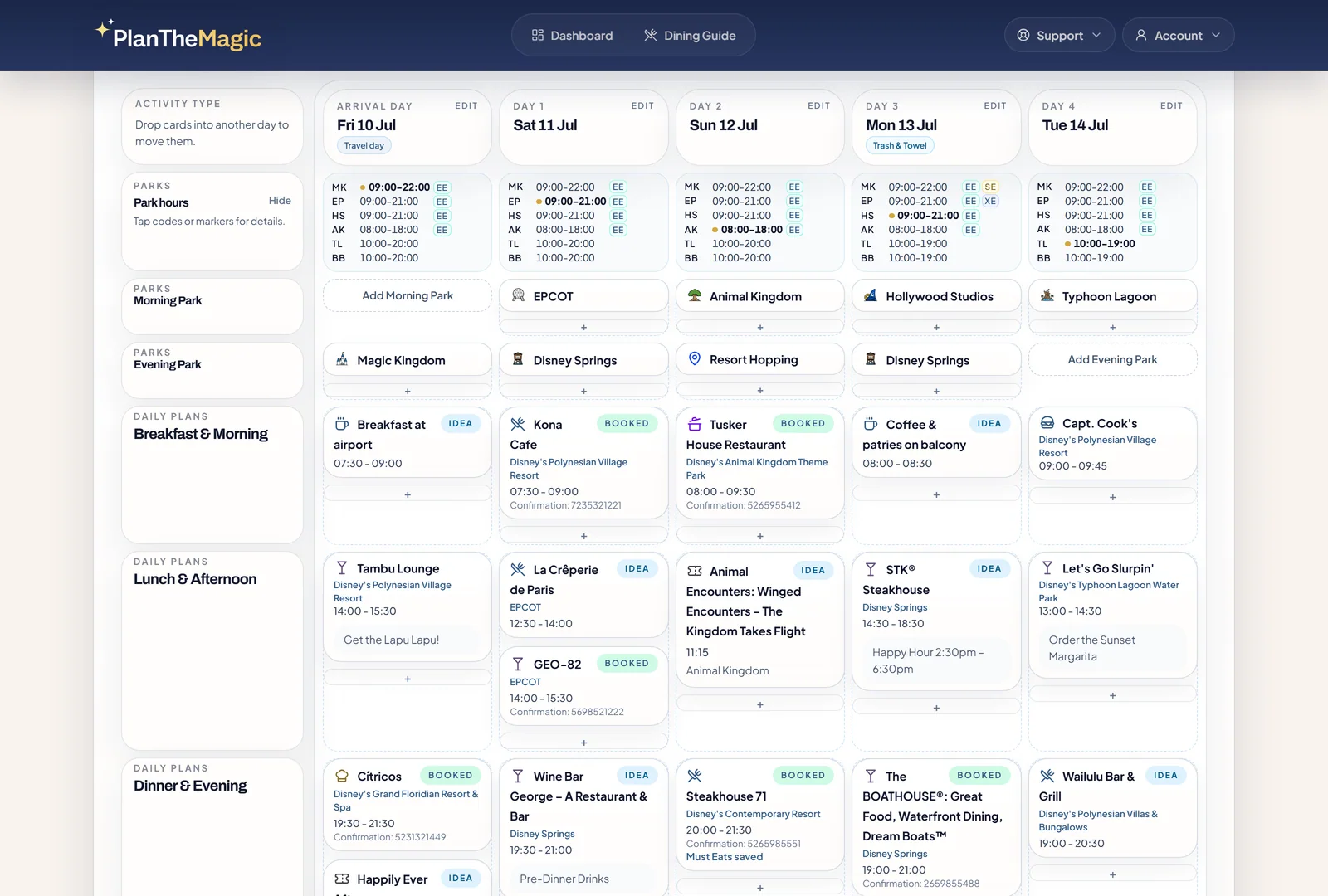
Trip shape
Add parks, meals, and notes by trip day.
ADR targets
Queue booking windows and follow-ups.
Daily checks
Use reminders and mobile views later.
What the trial is for
Start with the plan you already care about. The page below shows how the same trip moves from rough outline to booking morning, menu decisions, park-hour changes, and the daily details you carry with you.
Start your 7-day trialStart with parks, meals, notes, stay details, and the rough order of your days.
Track ADR windows, Disney booking links, follow-ups, and confirmations in one queue.
Carry daily views, reminders, park-hour changes, and useful notes into the trip.
Sketch Day 1, Day 2, and beyond before dates are locked.
Published hours and extra-hour markers sit beside each day.
Dining, notes, and confirmations stay with the right part of the day.
Start with the trip shape
Build the trip by Day 1, Day 2, and beyond. When your calendar shifts, parks, meals, notes, and tasks move with the trip instead of forcing a rebuild.
What this unlocks
Open Disney booking links when the window is ready.
Unavailable picks keep their place for later follow-up.
Swap similar restaurants into the same meal when plans change.
Dining booking morning
Track Disney dining reservations, often called ADRs, by what needs action next: ready, waiting, re-check, manual follow-up, or booked.
What this unlocks
Browse dishes without leaving the reservation.
Assign dishes to guests and add notes for next time.
Keep the dish title, description, and price from the day you ordered.
Menus and meal memory
Browse current menus, save Must Eats, log what each guest ordered, and keep notes for the next visit, all attached to the meal you planned.
What this unlocks
See park hours across the trip in one compact row.
Early entry, extended evening, and special hours stay visible.
Booked trips can receive emails when saved park days change.
Park hours and showtimes
Keep published hours, extra-hour markers, entertainment times, and saved parks beside the trip days they belong to, so changes are easier to catch before you travel.
What this unlocks
See booking moments and trip starts across active plans.
Receive rough-plan, ADR, pre-trip, and daily briefing reminders.
Print, save PDF, import from a spreadsheet, or export the trip.
Before, during, and after
Get planning nudges, ADR reminders, pre-trip summaries, daily briefings, printable plans, and export options from the details you already saved.
What this unlocks
Complete paid feature index
The tour shows the main reasons to start a trial. Open these groups when you want the complete paid-product checklist.
Create parks, meals, tasks, stays, and notes by Trip Day 1, Trip Day 2, and beyond.
Move the trip later or earlier while keeping saved plans attached to the right trip days.
See countdowns, current focus, planning progress, next booking moments, and active trips in one place.
Use full-trip, focus, and widescreen planner views on desktop, then check a readable day view on mobile.
Save party size, guest names, resort or off-site stay details, DVC notes, trip notes, and a custom trip photo.
Keep past trips available, including the planning trail and saved dining memories from visits you have already taken.
Search Disney dining with area, price range, cuisine, dining-plan, mobile-order, walk-up waitlist, map, menu, and booking links.
If a park restaurant does not match the park planned for that day, the planner calls that out before you commit.
Track which ADRs are open, which are waiting, and which need manual follow-up, including Disney Resort booking-window rules.
Open booking pages, mark meals booked, save confirmation numbers, mark unavailable picks, and clear re-checks as plans change.
Load similar reservation options using park fit, area, cuisine, service style, and price signals, then swap one into the meal.
Move completed ADRs out of the active queue while keeping confirmation numbers close when you need them.
Save a short list of standout dishes for the exact restaurant and meal you are planning.
Browse the current menu from the meal workspace before deciding what your group may want.
Tap dishes, assign them to guests, and keep the order attached to the reservation.
Mark what someone loved, would order again, or would skip next time, with room for notes.
Save custom items when someone orders something that is not on the menu list.
See what you ordered before, with saved title, description, and price, then compare that memory with the current menu.
Show published hours across the trip in a compact strip, with selected park hours highlighted in the planner.
See early entry, extended evening, and special-hour markers without crowding the park cards.
Receive an email when saved park days change before the trip or while the trip is underway.
Search parades and shows by park, choose posted showtimes, and place them into the right part of the day.
When a show moves to a day without a matching posted time, the planner clears the time instead of carrying over a stale one.
If a rough trip is getting close, get prompted to mark it booked so reservation reminders and briefings can start.
Get a heads-up the evening before an ADR window opens and a final reminder shortly before booking time.
Two days before travel, receive a trip summary with day-by-day highlights and unfinished planning work.
Each trip morning, receive that day's parks, meals, reservations, tasks, notes, stay context, and housekeeping items.
Create a compact or detailed print view with options for park hours, tasks, confirmation numbers, notes, and stay details.
Import planner rows from a spreadsheet or export the trip when you want an outside copy.
Before you start
Built for Disney World planners juggling park days, ADR windows, changing hours, menus, notes and confirmations.
Payment details are saved securely with Stripe before the trial starts.
Yes. Cancel before the trial ends and you will not be charged.
Yes. Plan by Day 1, Day 2, and beyond, then shift dates later.
Yes. Print, save PDF, import from a spreadsheet, or export the trip.
No. PlanTheMagic is independent and is not affiliated with or endorsed by The Walt Disney Company.
Ready to start?
Start with one real trip. Add a park day, a meal or an ADR target, then see how the planner keeps the moving parts together.
$24/year after trial. Cancel before the trial ends and you will not be charged.